loader

Activity No. 12: building a reversing radar (Starter kit Vittascience)

Combine the ultrasonic sensor, the buzzer and the LED with the NUCLEO-L476 board
  • NUCLEO-L476RG board
  • MicroUSB cable
  • Base shield Grove
  • Ultrasonic distance sensor
  • Led RGB Neopixel Grove
  • Buzzer Grove

The cars are equipped with radars of reversing which are triggered when reverse gear is engaged. The "beeps" emitted indicate proximity to an object not visible in the mirrors. 

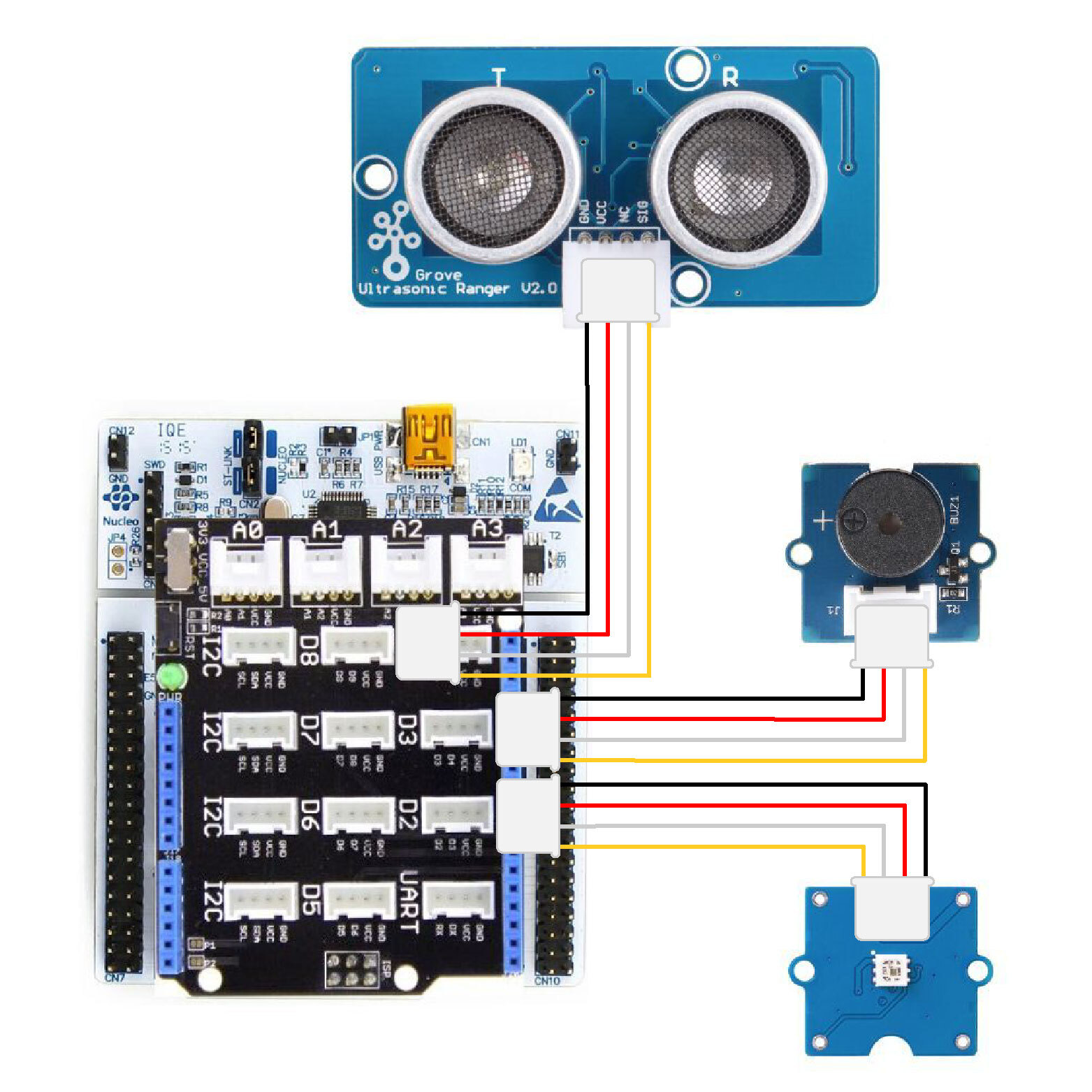
Here is the connection to make to make a reversing radar: 
- Connect the Shield Grove to the connectors of the card. 
- Connect using the Grove cable, the LED to one of the available ports. We will choose port D2.
- Connect the buzzer to port D3.
- Connect the ultrasound module using the Grove cable to D8.

car-radar-EN

Let's get to the programming now! 

The program we are going to create will measure the distance between the ultrasound module and an object, light up the LED with a color defined according to the distance and emit a "beep". 

We are going to use several blocks:
- " if ... then ... else if.... then .... else if ... then ...." available in the Logic of the block locker. 
- "[Grove Ultrasonic Sensor] distance (cm) D8", available in the Sensors, to retrieve the module value.
- "[Buzzer/Speaker] play frequency...during...on D3", available in the Actuators section of the block locker.
- "[Neopixel] control all LEDs at ... on pin D2", available in the Display 


- if the distance is less than 15 cm then
check all the red LEDs on D2
play frequency 800 for 500ms on D3
-  otherwise if the distance is greater than 15cm and less than 50cm
thencheck all LEDs in orange on D2
play frequency 800 for 500ms on D3 -otherwise
if the distance is greater than 50 cm then 
check all LEDs in green on D2


Use the interface to create the rangefinder program: 


Launch the simulator to check that your program is running correctly or download it to the card. 

You succeeded ? Perfect, you now know how to program a reversing radar using your NUCLEO-L476RG board! 
Discover the other activities of the Starter kit by clicking on the icons below.

Licence d'utilisation

Licence Creative Commons

Cette ressource est mise à disposition selon les termes de la Licence Creative Commons Attribution - Partage dans les Mêmes Conditions 2.0 France